Best Smart Toys with Real Learning Value
Smart toys that teach problem-solving, coding logic, and engineering through repeat play.
Snapshot
| Toy | Age | Price | Best for | Link |
|---|---|---|---|---|
| #1 National Geographic Epic Circuits Science Kit | 8+ | CAD $55–$85 | Electronics experiments without repeating Snap Circuits again | Check Price |
| #2 Teach Tech Mech-5 Mechanical Coding Robot | 8+ | CAD $45–$70 | Screen-free mechanical coding with visible command buttons | Check Price |
| #3 Makeblock Codey Rocky | 6+ | CAD $170–$230 | Beginner robotics and block-based coding | Check Price |
| #4 Educational Insights Artie 3000 The Coding Robot | 7+ | CAD $60–$80 | Drawing-based robot coding with block and text pathways | Check Price |
Affiliate links. Prices can change.
A smart toy earns its place when it teaches logic, systems, or iteration through repeat play.
The label "smart toy" gets used too loosely. Some toys are smart because they connect to an app. Some are smart because they talk, flash, or react. That does not automatically mean they teach anything useful. A toy with real learning value should help a child understand cause and effect, solve a problem, test a hypothesis, or build confidence through practice.
National Geographic Epic Circuits Science Kit
Reliable engagement, low setup friction, and strong replay value for real family routines.
This guide focuses on toys that are practical, repeatable, and useful beyond the first week. The strongest picks are not always the fanciest. They are the ones kids can return to, understand a little more each time, and use without turning every session into parent-led tech support.
If you want a broader starting point, compare this list with AI toys for kids, educational gadgets for kids, and best robot toys for kids.
Quick Answer
For most families, National Geographic Epic Circuits Science Kit is the best balance of price, hands-on learning, and visible science payoff. Teach Tech Mech-5 is the best choice if you want coding ideas without an app. Botley 2.0 is the simplest screen-free coding pick for younger kids. Codey Rocky and Artie 3000 have more digital learning depth, but they need more setup and parent patience.
What "Real Learning Value" Means
Real learning value is not the same as "educational" printed on the box. For this guide, a smart toy had to support at least three of these:
- repeat use after the first novelty session
- visible cause and effect
- problem-solving rather than passive watching
- age-appropriate challenge
- a path from beginner success to harder experiments
- enough independence that a child can eventually use it without constant adult rescue
That last point is important. A toy can be educational and still fail in a real home if it needs a parent to manage every step. The best smart toys make adult support useful at the beginning, then let the child take more control.
What to Look For
- Fast entry. If setup is complicated, attention disappears.
- Clear feedback. Kids stay engaged when they can see progress quickly.
- Replay value. Good toys survive past the novelty spike.
- Real problem-solving. The child should have to choose, test, debug, build, or revise.
- Manageable tech friction. Apps, batteries, updates, and pairing should not dominate play.
- A clear next step. The toy should show how to move from easy wins to harder challenges.
Our Top 6 Picks
Electronics experiments without repeating Snap Circuits again
Pros
- ✓ Fresh circuits angle
- ✓ 40+ experiments
- ✓ Good science gift positioning
Cons
- ✗ Needs organization
- ✗ May require adult help early
- ✗ Less open-ended than LEGO-style builds
National Geographic Epic Circuits Science Kit is the best overall pick because it gives kids a concrete electronics experience without making parents gather separate parts. The experiments are visible and easy to explain: connect the right pieces, complete the path, and something happens.
It is strongest for kids who like step-by-step activities but still want a science payoff. The organisation piece matters. Use a divided bin or resealable bags from the beginning, because circuit kits lose value quickly when pieces scatter.
Screen-free mechanical coding with visible command buttons
Pros
- ✓ No app required
- ✓ Mechanical coding is easy to explain
- ✓ More unusual than standard coding robots
Cons
- ✗ Build setup required
- ✗ Not ideal for impatient kids
- ✗ Mechanical actions are limited
Teach Tech Mech-5 is useful because the coding idea is visible. Instead of dragging blocks on a screen, kids can see how mechanical inputs shape what the robot does. That makes it easier to explain commands, sequence, and debugging.
The tradeoff is assembly. This is not the best first pick for a child who melts down when a build takes longer than expected. It is better for kids who like models, tools, or the satisfaction of making the mechanism work.
Makeblock Codey Rocky
Beginner robotics and block-based coding
Pros
- ✓ Real coding pathway
- ✓ Strong classroom reputation
- ✓ Good STEM progression
Cons
- ✗ Higher price point
- ✗ Needs setup help for younger kids
- ✗ Not ideal for quick casual play
Makeblock Codey Rocky has a stronger coding pathway than many toy robots. It can support block-based programming and a gradual move toward more serious STEM learning. That makes it a good pick for kids who already show interest in robots or coding games.
The price and setup make it less appealing as a casual gift. Buy it when you expect to help at first and when your child will return to it across multiple sessions. If you want a lower-friction robot first, start with a simpler option from best robot toys for kids.
Drawing-based robot coding with block and text pathways
Pros
- ✓ Real coding payoff
- ✓ Creative drawing output
- ✓ Multiple coding modes
Cons
- ✗ Needs a device
- ✗ Older beginner fit
- ✗ Requires paper and marker setup
Artie 3000 is a good match for kids who like art more than robots. The learning payoff is that code turns into a visible drawing, which makes abstract commands easier to understand. If the angle is wrong or the distance is off, the picture shows it immediately.
It does require a device, paper, markers, and enough table space. That makes it less spontaneous than a handheld fidget or simple building toy, but more memorable when the child enjoys creative output.
Engineering logic through build-and-test coaster puzzles
Pros
- ✓ Clear challenge progression
- ✓ Great cause-and-effect feedback
- ✓ Stronger novelty than another circuit kit
Cons
- ✗ Pieces need organization
- ✗ One-player-at-a-time tendency
- ✗ Harder cards may need help
ThinkFun Roller Coaster Challenge is not electronic, but it teaches engineering logic extremely well. Kids have to build a working path under constraints, test it, and adjust when the marble does not travel correctly.
This is a strong choice for families who want learning value without another app. It also works well as a bridge before more advanced construction or physics toys, including creative tech toys for kids.
Screen-free coding for young beginners
Pros
- ✓ No screen required
- ✓ Fast feedback
- ✓ Great for beginners
Cons
- ✗ Higher price
- ✗ Can need setup help
- ✗ Small parts
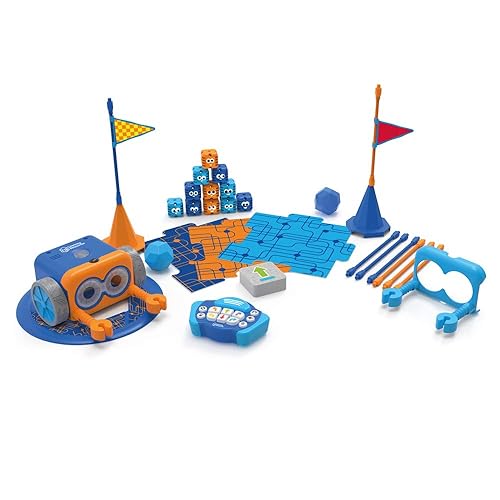
Botley 2.0 is the best beginner option for younger kids because the feedback is immediate and the coding is concrete. Press commands, send the robot, watch what happens, then adjust. That loop is simple enough for early elementary kids and still meaningful.
The small pieces can be a downside in busy homes, so keep Botley in a dedicated bin. It is also better for repeated short sessions than one long lesson.
Best Picks by Learning Goal
Coding without screens
Choose Botley 2.0 for younger kids or Teach Tech Mech-5 for older kids who can handle assembly. Both make sequencing visible without relying on a tablet.
Electronics and circuits
Choose National Geographic Epic Circuits Science Kit if you want concrete science experiments. It is especially useful for kids who like following a challenge card and seeing a clear result.
Engineering and spatial reasoning
Choose ThinkFun Roller Coaster Challenge. It has the cleanest build-test-adjust loop and less tech friction than app-connected toys.
Creative coding
Choose Artie 3000 if your child likes drawing. The robot makes code feel less abstract because the output is visible on paper.
Deeper robotics runway
Choose Makeblock Codey Rocky if your child already shows sustained interest and you are willing to support setup. It is overkill for a child who just wants a toy that works instantly.
How to Avoid Buying a "Smart" Toy That Gets Ignored
Watch the setup burden
If the toy needs charging, app pairing, account setup, updates, calibration, and an adult tutorial before play starts, it may fail even if it is educational. Setup friction is one of the biggest reasons smart toys become shelf clutter.
Match the feedback speed to the child
Some kids can work for 30 minutes before seeing a result. Others need feedback in 30 seconds. Younger kids, ADHD kids, and kids who get discouraged quickly usually do better with Botley, Roller Coaster Challenge, or a simple circuits project before moving to a more complex robot.
Look for repeatable prompts
A useful smart toy should invite questions like:
- Can you make it turn sooner?
- Can you make the light work another way?
- Can you solve the same card with fewer pieces?
- Can you make the robot draw a bigger shape?
If a toy only has one impressive demo, replay value will be weak.
Want better toy picks without the research rabbit hole?
Short, practical recommendations by age, need, and budget.
Practical Setup Tips
1) Start with one tiny win
Do not open every feature on day one. Complete one easy build or one simple command sequence, then stop while the toy still feels successful.
2) Store parts by function
Robots, circuits, and engineering puzzles all lose value when pieces disappear. Use a labelled bin, small containers, or resealable bags before the first cleanup.
3) Keep sessions short
Try 15 to 30 minutes for younger kids and 30 to 45 minutes for older kids. Longer sessions can work, but only if the child is still calm and curious.
4) Treat debugging as the lesson
When something does not work, ask what changed, where the signal stopped, or what the robot did instead. That turns frustration into evidence.
FAQ
Are these toys only for kids who already like STEM?
No. Some kids become more interested in STEM when the toy gives them a visible result quickly. For reluctant kids, start with Roller Coaster Challenge, Botley, or Artie 3000 instead of a complex robotics kit.
Are app-connected smart toys bad?
Not automatically. The problem is when the app becomes the whole experience. The best app-connected toys use the screen to control, code, or explain something that happens in the physical world.
Which smart toy is best for ADHD kids?
Look for fast feedback, short challenges, and low setup friction. Botley, Roller Coaster Challenge, and simple circuit kits are often easier than open-ended coding apps. For more options, see best sensory toys for ADHD kids and best toys for kids who rush through homework.
What if my child gets bored after the first project?
Use remix prompts. Change the path, add an obstacle, solve the challenge with fewer pieces, or ask the robot to do the same task a different way. Real learning usually happens when a child modifies the first success.
Related reads
- AI Toys for Kids
- Educational Gadgets for Kids
- Best Robot Toys for Kids
- Best Creative Tech Toys for Kids
- Best STEM Toys Under $40 for Kids
If You Can Only Buy One
National Geographic Epic Circuits Science Kit is the safest all-around pick because it has real science value, a reasonable price, and enough challenge progression to support repeat use.
If your priority is screen-free coding for younger kids, choose Botley 2.0 instead. If your child is older and already motivated by robots, Makeblock Codey Rocky has more long-term depth.
Want better toy picks without the research rabbit hole?
Get concise recommendations by age, need, and budget.
Where to go next
By age
Best Toys for 4-Year-Olds (Learning Through Play) (2026)
Keep the recommendations age-appropriate for your kid’s stage.
By need
Gifts for Neurodivergent Kids: A Parent's Guide (2026)
Jump to picks focused on ADHD, sensory, and regulation support.
By budget
Best Gifts for Kids Under $25 (2026)
Compare strong options in lower price brackets before you buy.
Related Articles
Sphero indi vs Code & Go Robot Mouse for First Robots
A beginner robot comparison for families choosing between tile-based and maze-based robot play.
Read more →
Best First Robot Toys for Curious Kids
Beginner robot toys for kids who like cause-and-effect, simple commands, and playful problem solving.
Read more →
Robot Factory vs Code & Go Robot Mouse for Younger Kids
A parent-friendly comparison between story-led robot building and simple sequencing play.
Read more →