Best First Robot Toys for Curious Kids
Beginner robot toys for kids who like cause-and-effect, simple commands, and playful problem solving.
Snapshot
| Toy | Age | Price | Best for | Link |
|---|---|---|---|---|
| #1 Learning Resources Code & Go Robot Mouse | 4+ | CAD $50–$80 | Simple screen-free sequencing and robot movement | Check Price |
| #2 Teach Tech Mech-5 Mechanical Coding Robot | 8+ | CAD $45–$70 | Screen-free mechanical coding with visible command buttons | Check Price |
| #3 Sphero indi At-Home Learning Kit | 4+ | CAD $180–$240 | Screen-free robot coding with colour tiles | Check Price |
| #4 Matatalab Tale-Bot Pro Coding Robot | 3+ | CAD $120–$160 | Preschool coding with buttons, maps, and story prompts | Check Price |
Affiliate links. Prices can change.
A first robot toy should feel discoverable before it feels technical.
For younger kids, “robot” can mean a lot of things: a button toy that moves, a coding mouse that follows commands, a mechanical build, or a screen-free kit with cards and maps. The best first robot is not always the most advanced one. It is the one your child can understand quickly enough to test, fail, adjust, and try again without needing an adult to rescue every step.
This guide focuses on beginner robot toys that are practical, repeatable, and useful beyond the first week. The strongest picks give kids cause-and-effect feedback, simple sequencing, and a reason to keep experimenting after the first “look, it moves” moment wears off.
Learning Resources Code & Go Robot Mouse
A strong first robot pick because it teaches command order with a simple press-test-fix loop and does not require an app.
What to Look For
- Visible cause and effect. Kids should be able to see what their command changed.
- Screen-free entry. A first robot works better when the robot, not the tablet, gets the attention.
- Short setup. If adults have to assemble, pair, charge, troubleshoot, and explain for 30 minutes, the toy is not really beginner-friendly.
- Progression. Look for challenge cards, maps, obstacle paths, or open-ended tasks so the toy does not become a one-day novelty.
- Error tolerance. Good robot toys make mistakes feel like part of the game.
How to Choose a First Robot Toy
Start with your child's frustration style. Some kids love figuring out why a robot turned the wrong way. Others feel defeated after one mistake. For the second group, choose a toy with big buttons, easy reset, and visible paths. For the first group, a buildable or mechanical robot can be more satisfying.
Also think about floor space. Robot toys need somewhere to move. A kit that looks compact in the box can become annoying if every session requires clearing the kitchen. A simple press-test-fix robot routine works best: press a few commands, test the path, fix one thing, and celebrate the change. That loop is the real learning.
Our Top 6 Picks
Simple screen-free sequencing and robot movement
Pros
- ✓ No screen required
- ✓ Clear command-and-test loop
- ✓ Affordable Botley-style entry point
Cons
- ✗ Needs batteries
- ✗ Less complete than the full activity set
- ✗ Best with added DIY paths or obstacles
Screen-free mechanical coding with visible command buttons
Pros
- ✓ No app required
- ✓ Mechanical coding is easy to explain
- ✓ More unusual than standard coding robots
Cons
- ✗ Build setup required
- ✗ Not ideal for impatient kids
- ✗ Mechanical actions are limited
Screen-free robot coding with colour tiles
Pros
- ✓ No reading required
- ✓ Immediate robot feedback
- ✓ Strong progression from simple paths to problem solving
Cons
- ✗ Expensive
- ✗ Needs floor space
- ✗ Colour tiles can get misplaced
Preschool coding with buttons, maps, and story prompts
Pros
- ✓ Screen-free
- ✓ Good for prereaders
- ✓ Immediate movement feedback
Cons
- ✗ Limited advanced depth
- ✗ Costs more than basic coding toys
- ✗ Needs charging
Makeblock mTiny Coding Kit
Screen-free tap-card robot coding for prereaders
Pros
- ✓ No app required
- ✓ Story-map play keeps it approachable
- ✓ Good for early sequencing
Cons
- ✗ Expensive
- ✗ Bulkier kit
- ✗ Less open-ended than block-based coding
Screen-free coding for young beginners
Pros
- ✓ No screen required
- ✓ Fast feedback
- ✓ Great for beginners
Cons
- ✗ Higher price
- ✗ Can need setup help
- ✗ Small parts
Why These Picks Made the List
Learning Resources Code & Go Robot Mouse
The Code & Go Robot Mouse is the easiest first step for many families because the learning loop is visible. Kids press directional buttons, send the mouse across the floor or a homemade maze, then change the sequence when it misses the target. That is real sequencing practice without asking a 4- or 5-year-old to understand a coding app.
The basic robot is less complete than the full activity set, so it helps to make your own paths with painter's tape, blocks, books, or paper “cheese” targets. It needs batteries, and younger kids may still need help clearing the command memory. But as a first robot, the setup-to-learning ratio is strong.
Teach Tech Mech-5 Mechanical Coding Robot
The Mech-5 is better for kids who like building and want to see how commands become physical action. It does not rely on an app. Instead, kids use mechanical coding buttons and watch the robot perform movement patterns. That makes the concept concrete in a different way from button-based floor robots.
The tradeoff is patience. This is not the best first robot for a child who wants instant play out of the box. The build matters, and some kids will need adult help before the fun begins. Choose it for an 8+ child who enjoys kits, visible gears, and “how does this work?” questions.
Sphero indi At-Home Learning Kit
Sphero indi is a polished screen-free robot system for prereaders because the robot responds to colour tiles. Kids build a path, watch the car react, then adjust the sequence by moving tiles. It feels more like play than instruction, and the feedback is immediate enough for young children.
The price is the main hesitation. It also needs floor space and a system for keeping the colour tiles together. If those pieces disappear into a toy bin, the kit loses its magic. It is strongest for families who want a durable early-coding toy and can store it in one dedicated box.
Matatalab Tale-Bot Pro Coding Robot
Tale-Bot Pro is a good fit for preschool and early elementary kids who respond to maps, stories, and button commands. It gives immediate movement feedback and does not require reading, which helps kids focus on sequence and direction instead of menus.
It has limits. Advanced kids may outgrow the depth faster than they would with a more expandable robotics system. It also costs more than basic button robots and needs charging. Treat it as an inviting early-coding world, not a long-term robotics curriculum.
Makeblock mTiny Coding Kit
mTiny is strongest when a child likes story play and physical cards. Instead of dragging blocks on a screen, kids tap command cards and move through maps. That makes sequencing feel tangible, which is useful for prereaders and kids who learn better through hands-on routines.
It is expensive and bulkier than many first robots. Storage matters because the cards, maps, and robot need to stay together. If your home already struggles with missing game pieces, this kit may become frustrating unless it has a dedicated bin.
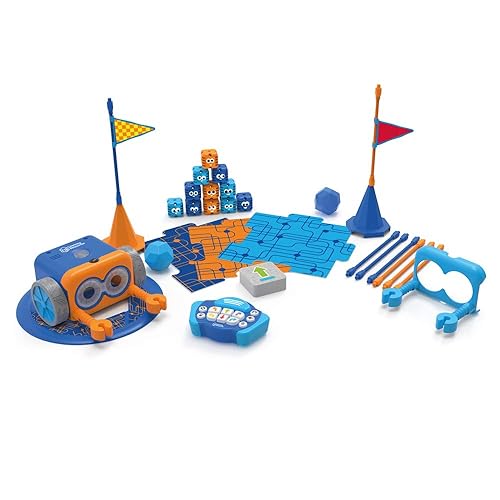
Botley 2.0 by Learning Resources
Botley 2.0 is the most familiar “first coding robot” in this group. It is screen-free, friendly, and gives fast feedback. Kids can program sequences, set up obstacles, and test commands without needing a tablet account or subscription.
It costs more than the Robot Mouse, and some children need setup help with obstacles and modes. Small parts also matter if younger siblings are around. Botley is a better choice when you want a fuller beginner kit; Code & Go Robot Mouse is better when you want the simplest first step. For more options in this lane, see best robot toys for kids.
Setup Reality Parents Should Know
Most robot toys need either batteries, charging, or floor space. Before buying, decide where the robot will live and where it will run. A shallow bin with the robot, cards, tiles, obstacles, and instructions prevents the “missing piece” problem that kills replay value.
Use short challenges at first. “Can you make it reach the couch?” is better than “learn coding.” If the robot fails, ask one question: did it turn too soon, too late, or not enough? That keeps frustration focused on debugging instead of the child feeling wrong.
Best Fit by Child
- For preschoolers: Sphero indi, Tale-Bot Pro, and Robot Mouse are the friendliest starts.
- For kids who like building: Teach Tech Mech-5 makes the mechanism part of the fun.
- For kids who want a complete kit: Botley 2.0 has more built-in activity depth.
- For kids who get frustrated quickly: choose Robot Mouse or indi and begin with tiny paths.
- For screen-sensitive households: all six picks keep the core play off tablets.
Want better toy picks without the research rabbit hole?
Short, practical recommendations by age, need, and budget.
FAQ
What age is best for a first robot toy?
Many kids are ready around 4 or 5 if the robot uses buttons, tiles, or simple paths. Buildable mechanical robots usually fit better around 8+ because assembly and patience matter more.
Do robot toys actually teach coding?
The best beginner robot toys teach early coding habits: sequencing, prediction, testing, debugging, and persistence. They do not need to teach a programming language to be useful.
Should I buy a robot toy with an app?
For a first robot, screen-free is usually easier. Apps can add depth later, but they also add setup, updates, and distraction. Start with physical commands if your goal is independent play.
What if my child gets upset when the robot does the wrong thing?
Make the first paths very short. Two or three commands are enough. Celebrate the fix, not the perfect run. A mistake is the point of the toy when the child can recover from it.
Related reads
Want better toy picks without the research rabbit hole?
Get concise recommendations by age, need, and budget.
Where to go next
By age
Best Toys for 4-Year-Olds (Learning Through Play) (2026)
Keep the recommendations age-appropriate for your kid’s stage.
By need
Gifts for Neurodivergent Kids: A Parent's Guide (2026)
Jump to picks focused on ADHD, sensory, and regulation support.
By budget
Best Gifts for Kids Under $25 (2026)
Compare strong options in lower price brackets before you buy.
Related Articles
Sphero indi vs Code & Go Robot Mouse for First Robots
A beginner robot comparison for families choosing between tile-based and maze-based robot play.
Read more →
Robot Factory vs Code & Go Robot Mouse for Younger Kids
A parent-friendly comparison between story-led robot building and simple sequencing play.
Read more →
Mech-5 vs Botley: Which Screen-Free Coding Toy Fits Better?
Compare a mechanical coding robot with a beginner-friendly programmable robot for kids.
Read more →